
7 Segment 8-Digit Display ที่ควบคุมโดย MAX7219 เป็นโซลูชันที่มีประสิทธิภาพสำหรับการแสดงผลตัวเลขและข้อความ ด้วยการเชื่อมต่อที่ง่ายและความสามารถในการควบคุมหลายหลักในครั้งเดียว
1.ดาวน์โหลด และติดตั้ง Library LedControl
ติดตั้ง Library LedControl
ArduinoIDE > Sketch > Include Library > Add .ZIP Library > หาไฟล์ที่ดาวน์โหลด
2.ต่ออุปกรณ์
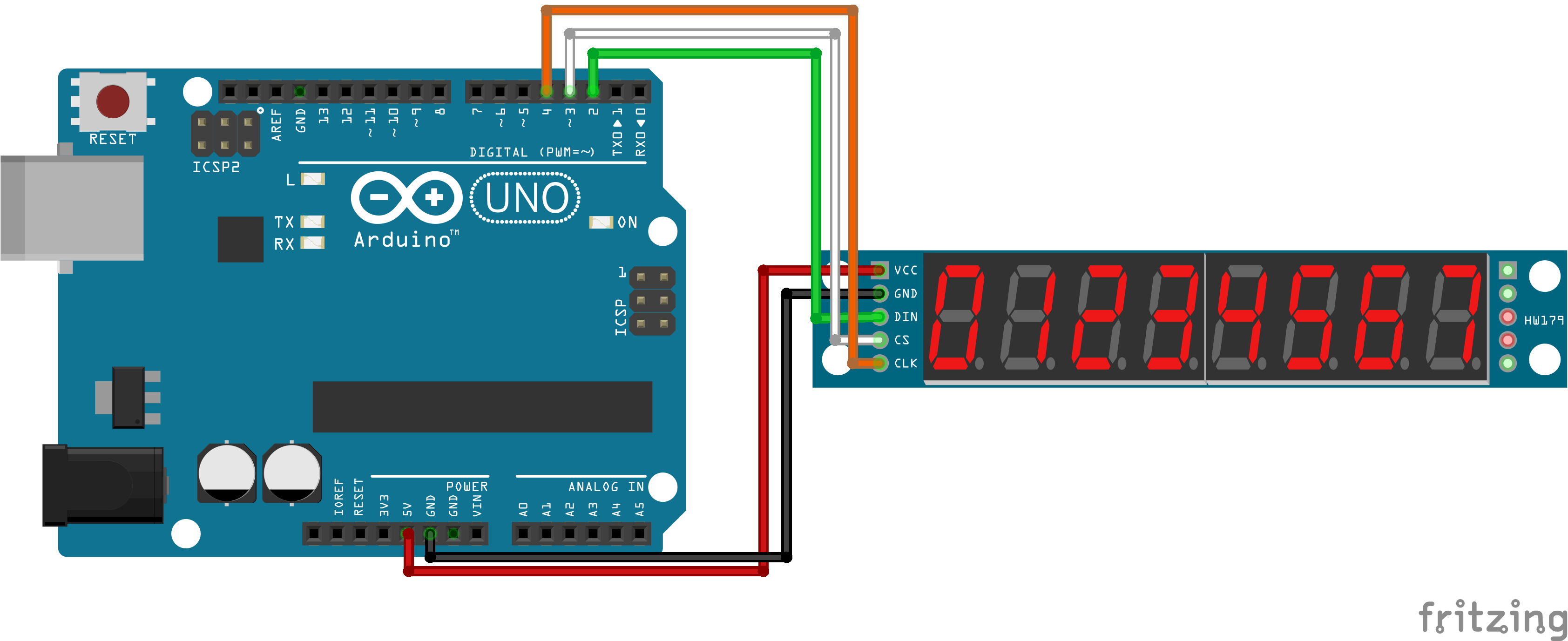
7 Segment 8-Digit > Arduino UNO
VCC>5VGND>GNDDIN>PIN2CS>PIN3CLK>PIN4
3.ลงโปรแกรม
Copy โค้ดด้านล่าง
Arduino
1#include <LedControl.h>
2
3// กำหนดพิน
4const int dataIn = 2;   // DIN
5const int clk = 4;      // CLK
6const int cs = 3;       // CS
7
8// สร้างวัตถุ LedControl
9LedControl lc = LedControl(dataIn, clk, cs, 1); // 1 คือจำนวน MAX7219 ที่ใช้งาน
10
11void setup() {
12  lc.shutdown(0, false);       // เปิด MAX7219
13  lc.setIntensity(0, 8);       // ตั้งความสว่าง (0-15)
14  lc.clearDisplay(0);          // เคลียร์หน้าจอ
15}
16
17void loop() {
18  // แสดงตัวเลข 0-9 ใน 8 หลัก
19  for (int i = 0; i < 10; i++) {
20    displayNumber(i);
21    delay(1000); // หน่วงเวลา 1 วินาที
22  }
23}
24
25void displayNumber(int num) {
26  // แสดงตัวเลขใน 8 หลัก
27  for (int i = 0; i < 8; i++) {
28    lc.setDigit(0, i, num, false); // แสดงตัวเลขในหลักที่ i
29  }
30}
311#include <LedControl.h>
2
3// กำหนดพิน
4const int dataIn = 2; // DIN
5const int clk = 4; // CLK
6const int cs = 3; // CS
7
8// สร้างวัตถุ LedControl
9LedControl lc = LedControl(dataIn, clk, cs, 1); // 1 คือจำนวน MAX7219 ที่ใช้งาน
10
11void setup() {
12 lc.shutdown(0, false); // เปิด MAX7219
13 lc.setIntensity(0, 8); // ตั้งความสว่าง (0-15)
14 lc.clearDisplay(0); // เคลียร์หน้าจอ
15}
16
17void loop() {
18 // แสดงตัวเลข 0-9 ใน 8 หลัก
19 for (int i = 0; i < 10; i++) {
20 displayNumber(i);
21 delay(1000); // หน่วงเวลา 1 วินาที
22 }
23}
24
25void displayNumber(int num) {
26 // แสดงตัวเลขใน 8 หลัก
27 for (int i = 0; i < 8; i++) {
28 lc.setDigit(0, i, num, false); // แสดงตัวเลขในหลักที่ i
29 }
30}
31