MPU-6050 เป็นเซ็นเซอร์ที่รวมการทำงานของ Accelerometer และ Gyroscope ไว้ในตัวเดียวกัน โดยมีการเชื่อมต่อผ่าน I2C และได้รับความนิยมในการใช้งานด้านการวัดทิศทาง การเคลื่อนไหว และการทรงตัว เช่น
ในโดรน หุ่นยนต์ หรืออุปกรณ์ตรวจจับการเคลื่อนไหว
1.ดาวน์โหลด และติดตั้ง MPU6050 & I2Cdev
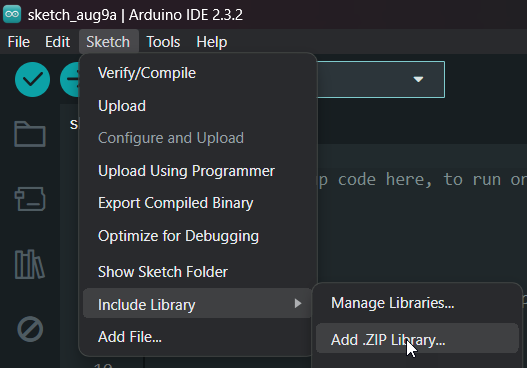
ติดตั้ง Library
ArduinoIDE > Sketch > Include Library > Add .ZIP Library > หาไฟล์ที่ดาวน์โหลด
2.ต่ออุปกรณ์
.png?alt=media&token=c4c4dd03-1b2c-488f-8fad-14f5670cd28b)
MPU6050 > Arduino UNO
VCC>5VGND>GNDSCL>A5SDA>A4
3.ลงโปรแกรม
Copy โค้ดด้านล่าง
Arduino
1#include "I2Cdev.h"
2
3#include "MPU6050.h"
4
5#include "Wire.h"
6
7MPU6050 mpu;
8
9int16_t ax, ay, az;
10
11int16_t gx, gy, gz;
12
13int valx , valy , valz;
14
15char rd;
16
17int prevVal;
18
19int led = 13 ;
20
21int pin11 = 11 , pin10 = 10 ;
22
23int val1 , val2 ;
24
25int valgy1 = 0 , valgy2 = 0;
26
27void setup()
28
29{
30
31pinMode(led,OUTPUT) ;
32
33Wire.begin();
34
35Serial.begin(38400);
36
37Serial.println("Initialize MPU");
38
39mpu.initialize();
40
41Serial.println(mpu.testConnection() ? "Connected" : "Connection failed");
42
43}
44
45void loop()
46
47{
48
49mpu.getMotion6(&ax, &ay, &az, &gx, &gy, &gz);
50
51valx = map(ax, -17000, 17000, 0, 179);
52
53valy = map(ay, -17000, 17000, 0, 179);
54
55valz = map(az, -17000, 17000, 0, 179);
56
57Serial.print("axis x = ") ;
58
59Serial.print(valx) ;
60
61Serial.print(" axis y = ") ;
62
63Serial.print(valy) ;
64
65Serial.print(" axis z = ") ;
66
67Serial.println(valz) ;
68
69delay(100);
70
71}1#include "I2Cdev.h"
2
3#include "MPU6050.h"
4
5#include "Wire.h"
6
7MPU6050 mpu;
8
9int16_t ax, ay, az;
10
11int16_t gx, gy, gz;
12
13int valx , valy , valz;
14
15char rd;
16
17int prevVal;
18
19int led = 13 ;
20
21int pin11 = 11 , pin10 = 10 ;
22
23int val1 , val2 ;
24
25int valgy1 = 0 , valgy2 = 0;
26
27void setup()
28
29{
30
31pinMode(led,OUTPUT) ;
32
33Wire.begin();
34
35Serial.begin(38400);
36
37Serial.println("Initialize MPU");
38
39mpu.initialize();
40
41Serial.println(mpu.testConnection() ? "Connected" : "Connection failed");
42
43}
44
45void loop()
46
47{
48
49mpu.getMotion6(&ax, &ay, &az, &gx, &gy, &gz);
50
51valx = map(ax, -17000, 17000, 0, 179);
52
53valy = map(ay, -17000, 17000, 0, 179);
54
55valz = map(az, -17000, 17000, 0, 179);
56
57Serial.print("axis x = ") ;
58
59Serial.print(valx) ;
60
61Serial.print(" axis y = ") ;
62
63Serial.print(valy) ;
64
65Serial.print(" axis z = ") ;
66
67Serial.println(valz) ;
68
69delay(100);
70
71}
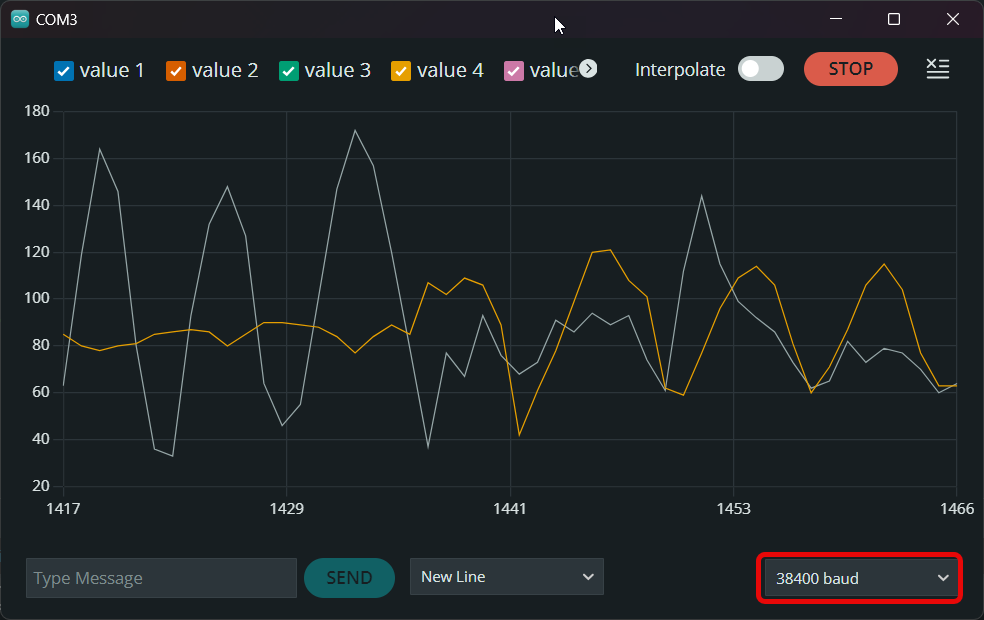
4.ผลลัพธ์
โค้ดนี้จะแสดงเป็นข้อมูลค่าที่อ่านได้จากแกน X, Y และ Z ของเซ็นเซอร์ MPU6050 ที่ถูกแปลงให้อยู่ในช่วง 0 ถึง 179